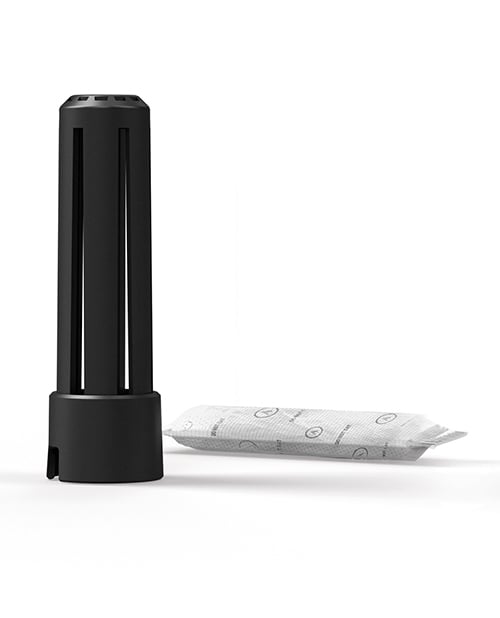
Arcwave Ion DryTech Packs x3 is a three-pack of reusable replacement drying inserts for the DryTech stick in the original Arcwave Ion storage base. Arcwave identifies this exact accessory as SKU AWKN1AFZ and GTIN 4251460604437. The current Stag Standard record is product 4404.
This package contains three DryTech packs, not three DryTech sticks. Each pack fits inside the separate stick supplied with the original Ion storage base and helps speed the post-cleaning drying process. The stick, storage base, Arcwave Ion device and cleaning supplies are not listed as included with this replacement three-pack.
Exact fit and purpose
- Three replacement DryTech packs
- Made for the DryTech stick in the original Arcwave Ion storage base
- Helps the storage system dry the cleaned Ion components
- Reusable after the manufacturer’s microwave recovery process
- Non-powered accessory with no battery, cable, motor, app or controls
Compatibility matters. Arcwave’s current product page names the Arcwave Ion Storage Base; it does not state that these packs fit every Arcwave product or every later storage system. Check the SKU on this page, compare the replacement with the pack and stick you already own, and consult Arcwave before ordering if the model is uncertain.
How the drying system fits together
Arcwave’s Ion manual shows a DryTech pack placed inside the DryTech stick, with the stick seated in the storage base. The cleaned device is dried before storage, then placed on the stick with its logo facing downward when the base is used for storage or charging. The packs are inserts; they do not replace the stick that holds them.
The DryTech pack supports drying after cleaning. It is not a cleaner, sanitizer, disinfectant, sleeve, charger or substitute for washing the device according to its manual. Remove visible moisture from the cleaned components as directed before relying on the storage system; Arcwave notes that drying the device before storage can extend the pack’s useful capacity.
Setup
- Confirm that the accessory package is SKU AWKN1AFZ and that your storage system is the original Arcwave Ion storage base named by the manufacturer.
- Inspect the pack and its wrapping. Do not use a torn, leaking, contaminated or otherwise damaged pack.
- Remove the clear outer packaging before putting the DryTech pack into the DryTech stick.
- Place one intact pack inside the stick as shown in the Arcwave Ion manual.
- Keep the pack dry and out of the mouth. The manufacturer’s manual labels the pack “do not eat.”
Reusable microwave recovery
When a pack has absorbed enough moisture, Arcwave says it can be dried for repeated use. The Ion manual instructs the owner to remove the pack from the DryTech stick and place the pack in a microwave at 300 watts, or on the microwave’s defrost setting, for 10 minutes. The manual also says direct contact with water must be avoided.
Use those values only for this exact Arcwave pack and follow the current instructions packaged with it if they differ. Remove the pack from the stick before microwave recovery. Do not microwave the stick, storage base, device, sleeve, cable, packaging or any damaged pack. Stop using a pack if its condition changes or the current manufacturer instructions direct replacement.
Cleaning boundary
Wash the Arcwave Ion components separately according to the device manual. The DryTech pack itself should not be washed, rinsed, submerged or exposed to direct water. Keep cleaner, lubricant and soap away from the pack. If the pack becomes wet, contaminated, torn or open, do not place it back into the stick.
Allow the cleaned parts to dry as directed before enclosing them for storage. Trapped moisture can create unwanted odor or material problems; a drying insert supports the process but does not prove that every surface is clean or fully dry.
When to replace a pack
Arcwave describes the packs as reusable but does not publish an unlimited service-life promise on the current product page. Inspect before every cycle. Replace a pack that is damaged, leaking, contaminated, misshapen, persistently damp after the authorized recovery process or no longer performing as expected. Do not open the pack or transfer its contents into another pouch.
What this listing does not include
This is not the separately sold Ion DryTech Stick and Pack set. It also is not an Ion device, Ion 2 device, storage or charging base, CleanTech sleeve, USB cable, lubricant or toy cleaner. If you need the holder as well as an insert, compare the manufacturer name and SKU carefully before buying.
Compare and shop
See more Arcwave products, browse stroker accessories and replacement parts, or explore the broader strokers and sleeves collection. You can also browse the replacement drying packs tag.
For general upkeep, read the materials and care guide and our stroker cleaning and drying guide. The live offer controls current price and stock. Review shipping and discreet packaging and the returns, refunds and hygiene policy before opening the package if compatibility is uncertain.
Frequently asked questions
Does this package contain three sticks?
No. Arcwave’s exact product page describes three replacement DryTech packs. The separate DryTech stick is the holder used in the original Ion storage base.
Can the packs be reused?
Yes. Arcwave says they are reusable and provides a microwave recovery process: remove the pack from the stick, use 300 watts or the defrost setting for 10 minutes, and avoid direct water contact.
Does a DryTech pack clean the Arcwave Ion?
No. It supports drying after the device has been cleaned according to the manual. It is not a cleaner, sanitizer or replacement for washing.
Will it fit Arcwave Ion 2?
The current first-party listing names the original Arcwave Ion Storage Base and does not make a universal compatibility claim. Confirm your exact storage system with Arcwave before ordering for another model.